
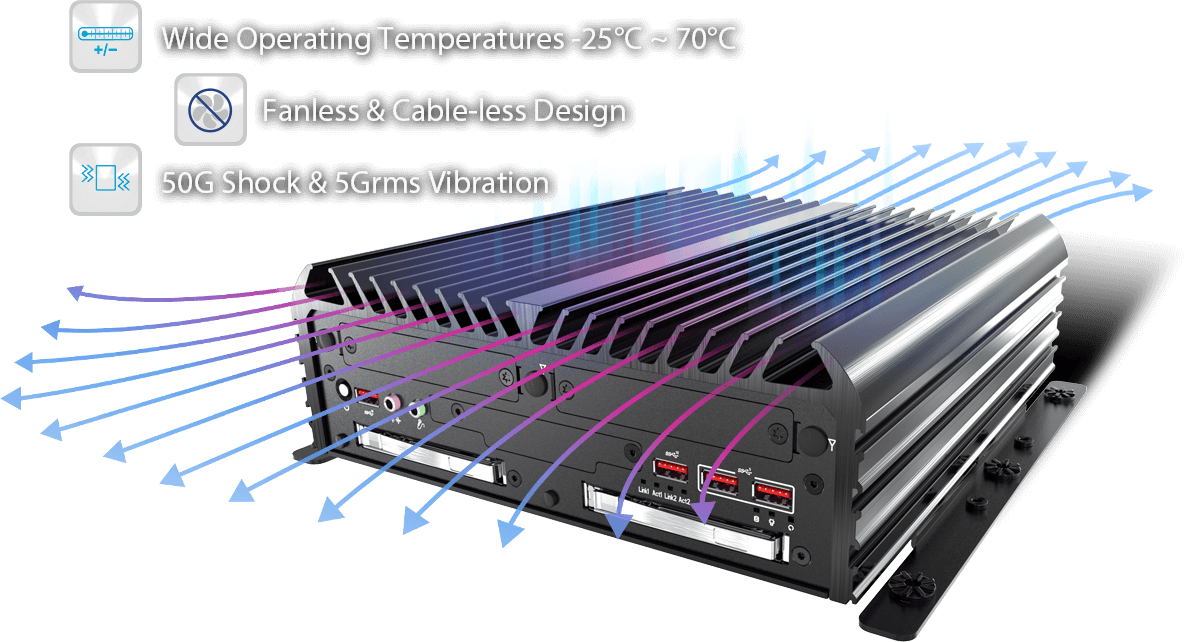
The Advantages of Fanless PCs
Fanless PCs, also known as passive cooling systems, are becoming increasingly popular in the world of computing. These innovative devices offer a range of benefits that make them an attractive option for many users.
Silent Operation
One of the primary advantages of fanless PCs is their silent operation. Without the noise generated by cooling fans, these computers provide a quiet and peaceful working environment, making them ideal for use in offices, libraries, and other noise-sensitive settings.
Improved Reliability
Because fanless PCs have fewer moving parts, they are generally more reliable than traditional computers with cooling fans. This can result in lower maintenance costs and longer device lifespan, providing users with a more dependable computing experience.
Dust and Debris Resistance
By eliminating cooling fans, fanless PCs are less susceptible to dust and debris buildup inside the system. This can help prevent overheating and prolong the life of internal components, reducing the risk of hardware failure due to dust accumulation.
Energy Efficiency
Fanless PCs typically consume less power than traditional computers with cooling fans. By eliminating the energy required to run fans, these devices can help reduce electricity costs and contribute to a more sustainable computing environment.
Compact Design
Many fanless PCs feature a compact and lightweight design, making them easy to transport and suitable for small spaces. Their slim profile and lack of bulky cooling systems make them an excellent choice for users who value portability and aesthetics.
In conclusion, fanless PCs offer a range of advantages that set them apart from traditional computers with cooling fans. From silent operation to improved reliability and energy efficiency, these innovative devices provide users with a compelling alternative for their computing needs.
Understanding Fanless PCs: Key Questions and Answers
- What is a fanless PC?
- How does a fanless PC stay cool without a fan?
- What are the advantages of using a fanless PC?
- Are fanless PCs quieter than traditional computers?
- Do fanless PCs have any disadvantages compared to computers with fans?
- Can I upgrade components in a fanless PC?
What is a fanless PC?
A fanless PC is a type of computer that utilizes passive cooling technology to dissipate heat without the need for cooling fans. Unlike traditional computers that rely on fans to regulate temperature and prevent overheating, fanless PCs employ heat sinks, heat pipes, and other passive cooling methods to maintain optimal operating temperatures. By eliminating the noise generated by cooling fans, fanless PCs offer a silent computing experience while also providing benefits such as improved reliability, dust resistance, energy efficiency, and compact design. This innovative approach to cooling makes fanless PCs an attractive option for users seeking a quiet and efficient computing solution.
How does a fanless PC stay cool without a fan?
A fanless PC stays cool without a fan by utilizing passive cooling methods such as heat sinks, heat pipes, and thermal pads. These components work together to dissipate heat generated by the internal components of the computer, allowing for efficient thermal management without the need for a cooling fan. Heat sinks absorb and disperse heat away from hot spots, while heat pipes transfer heat to areas with better airflow. Thermal pads help conduct heat away from critical components. By leveraging these passive cooling techniques, fanless PCs can maintain optimal operating temperatures without relying on noisy fans for cooling.
What are the advantages of using a fanless PC?
When considering the advantages of using a fanless PC, several key points stand out. Firstly, fanless PCs offer silent operation, making them ideal for noise-sensitive environments such as offices or libraries. Additionally, these systems tend to be more reliable due to their lack of moving parts, leading to lower maintenance costs and longer device lifespan. Fanless PCs are also resistant to dust and debris buildup, reducing the risk of overheating and hardware failure. Furthermore, these computers are energy-efficient and often feature a compact design, making them a practical and sustainable choice for users seeking a quiet, reliable, and efficient computing solution.
Are fanless PCs quieter than traditional computers?
Fanless PCs are indeed quieter than traditional computers that rely on cooling fans for temperature regulation. The absence of fans in fanless PCs eliminates the noise generated by spinning fan blades, resulting in a silent operation that is ideal for environments where noise levels need to be kept to a minimum. Users can enjoy a peaceful computing experience without the constant hum of cooling fans, making fanless PCs a popular choice for those seeking a quieter and more serene work or entertainment environment.
Do fanless PCs have any disadvantages compared to computers with fans?
Fanless PCs offer numerous advantages, such as silent operation, improved reliability, and energy efficiency. However, they do come with some potential disadvantages when compared to computers with fans. One of the main drawbacks of fanless PCs is their limited cooling capacity. Without fans to actively dissipate heat, fanless systems may struggle to effectively cool components under heavy workloads or in warm environments, potentially leading to performance throttling or reduced lifespan of internal hardware. Additionally, fanless PCs tend to be more expensive than traditional computers with fans due to the specialized cooling solutions required to maintain optimal operating temperatures. Despite these drawbacks, the benefits of fanless PCs often outweigh the limitations for users who prioritize quiet operation and reliability in their computing experience.
Can I upgrade components in a fanless PC?
When it comes to upgrading components in a fanless PC, there are some considerations to keep in mind. While fanless PCs are known for their silent operation and compact design, the lack of active cooling systems may limit the types of upgrades that can be performed. Components such as the CPU and storage drive may be upgradeable, but it is important to ensure that any new components are compatible with the passive cooling system to prevent overheating. Additionally, upgrading components in a fanless PC may require specialized knowledge or professional assistance due to the unique design of these systems. It is recommended to consult with the manufacturer or a qualified technician before attempting any upgrades to ensure optimal performance and reliability of the fanless PC.