
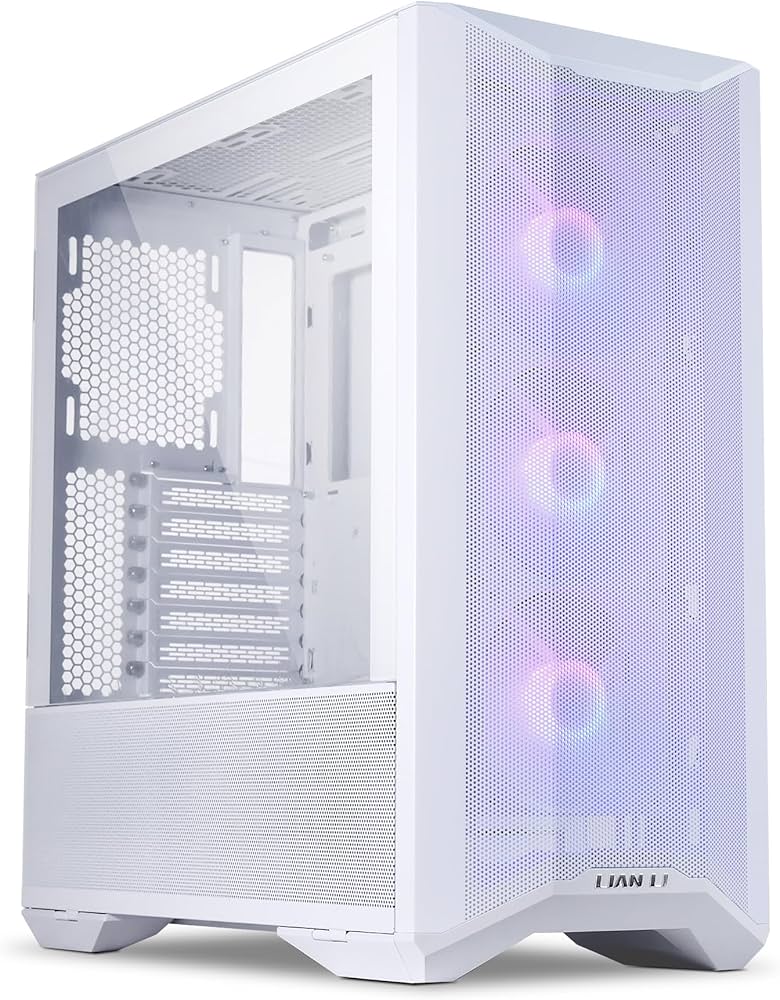
Lian Li LANCOOL II: A Flexible Mid-Tower PC Case
The Lian Li LANCOOL II is a mid-tower computer case designed to make PC building and maintenance more accessible. Its standout feature is a set of hinged panels that open to reveal the interior and cable-management area, reducing the need to remove several separate panels during upgrades or troubleshooting. The case combines a distinctive look with broad component compatibility and multiple cooling options.
Design and Accessibility
The LANCOOL II has tempered-glass side panels that swing open on hinges, giving builders a clear view of the system while making it easier to reach internal components. Hinged covers along the lower section also provide access to the power supply and cable-management spaces. This practical design is especially useful when adding storage, adjusting cables, or cleaning the system.
The case’s appearance varies by model. The original LANCOOL II has a more enclosed front panel, while the LANCOOL II Mesh models use a mesh front to prioritize airflow. Mesh RGB versions add lighting features. These differences matter: the mesh models are generally the better choice for builds that need strong cooling, while the original offers a more solid-front look.
Cooling and Component Support
The LANCOOL II supports common motherboard sizes, including Mini-ITX, Micro-ATX, and ATX. Some configurations can also accommodate wider E-ATX boards, though builders should check the specific model’s limits because a wider motherboard may cover cable-routing openings.
Cooling options include mounting points for case fans and radiators, with support depending on the location and configuration. The mesh versions’ ventilated front provides a more direct path for incoming air. As with any case, radiator thickness, graphics card length, and other component dimensions can affect fit, so it is wise to compare hardware measurements with the specifications for the exact LANCOOL II model.
Building and Cable Management
The case is designed to make everyday building tasks straightforward. Its hinged panels provide convenient access, while the lower compartment helps keep the power supply and excess cables out of sight. Removable and adjustable internal parts can also make room for different storage and cooling arrangements, depending on the configuration.
For builders who want to add newer connections or a different graphics-card presentation, Lian Li has offered accessories for certain LANCOOL II configurations. Availability and compatibility can vary, so check the case revision and accessory requirements before purchasing.
What to Consider Before Buying
- Choose the right version: The original LANCOOL II and the Mesh and Mesh RGB models differ in front-panel design and airflow.
- Check component clearance: Confirm graphics card, cooler, radiator, and motherboard dimensions against the specifications for the exact model.
- Plan your cooling setup: Fan support and included fans vary by version and bundle.
- Review front-panel connections: Check which USB ports are included and whether any desired connection requires an optional accessory.
Is the Lian Li LANCOOL II a Good Choice?
The Lian Li LANCOOL II is a versatile option for builders who value easy access, a clean presentation, and room to customize their cooling and storage setup. Its hinged panels are more than a visual detail: they make the case convenient to work in over the life of a PC. For airflow-focused builds, the LANCOOL II Mesh models are worth particular consideration. By choosing the version that best fits the system’s cooling needs and checking component clearances in advance, builders can make the most of this adaptable mid-tower case.
Optimizing Your Lian Li LANCOOL II: 9 Essential Tips for Better Airflow and Organization
- Check whether you have the LANCOOL II, Mesh, or Performance version; layouts and airflow differ.
- For better airflow, use front intake fans and rear or top exhaust fans.
- Confirm radiator and graphics-card clearances in the manual before buying parts.
- Route cables behind the motherboard tray and use the included covers to keep the build tidy.
- Open the hinged glass panels gently and leave room for them to swing outward.
- Use the lower side panels for easier access to the power supply and drive bays.
- Keep front and bottom air intakes clear of walls, carpets, and clutter.
- Clean the dust filters regularly to maintain airflow.
- Plan fan placement around your GPU and CPU cooler for balanced cooling.
Check whether you have the LANCOOL II, Mesh, or Performance version; layouts and airflow differ.
Before planning your build, check whether your case is the original LANCOOL II, the LANCOOL II Mesh, or the LANCOOL II Performance. These versions differ in front-panel design, internal layout, and airflow, which can affect cooling options and component fit. Confirm the exact model so you can choose compatible parts and set up ventilation effectively.
For better airflow, use front intake fans and rear or top exhaust fans.
For better airflow in the Lian Li LANCOOL II, set the front fans as intakes to bring cool air into the case, and use the rear or top fans as exhausts to push warm air out. This front-to-back and bottom-to-top flow helps cool key components and maintain steady temperatures.
Confirm radiator and graphics-card clearances in the manual before buying parts.
Before buying parts for the Lian Li LANCOOL II, check the manual for the exact radiator and graphics-card clearances for your case configuration. Radiator size and placement can affect the space available for a graphics card, and measurements may differ between LANCOOL II models. Comparing the manual’s specifications with your components’ dimensions can help prevent fit issues and save time during your build.
Route cables behind the motherboard tray and use the included covers to keep the build tidy.
For a clean, organized build in the Lian Li LANCOOL II, route cables behind the motherboard tray and use the included covers to conceal excess wiring. This keeps the main compartment looking neat, makes components easier to access, and helps maintain unobstructed airflow.
Open the hinged glass panels gently and leave room for them to swing outward.
Open the Lian Li LANCOOL II’s hinged glass panels gently to avoid putting unnecessary stress on the hinges or glass. Before swinging them outward, make sure there’s enough clearance beside the case so the panels won’t hit a wall, desk accessory, or nearby component.
Use the lower side panels for easier access to the power supply and drive bays.
The Lian Li LANCOOL II’s hinged lower side panels make it easier to reach the power supply and drive bays without removing the main side panels. Open the lower panels when installing or replacing a drive, checking power connections, or tidying cables in the bottom compartment. This convenient access can make upgrades and routine maintenance quicker and less cumbersome.
Keep front and bottom air intakes clear of walls, carpets, and clutter.
Keep the Lian Li LANCOOL II’s front and bottom air intakes clear of walls, carpets, and clutter to help maintain steady airflow. Blocking these openings can restrict cool air from reaching the case, which may lead to higher temperatures and louder fan operation. Place the case on a firm, level surface and leave enough space around the front and underside for air to circulate.
Clean the dust filters regularly to maintain airflow.
Clean the Lian Li LANCOOL II’s dust filters regularly to help maintain good airflow and keep dust from building up inside your PC. Check the filters every few weeks, especially if your computer is in a dusty room or runs often, and gently remove dust with a soft brush or compressed air. For washable filters, follow the case’s care instructions and let them dry completely before reinstalling.
Plan fan placement around your GPU and CPU cooler for balanced cooling.
Plan your fan placement around the GPU and CPU cooler to create balanced airflow throughout the Lian Li LANCOOL II. Position intake fans to bring cool air toward these heat-producing components, and use exhaust fans to move warm air out of the case. Check that the airflow path is clear and that fans aren’t working against one another; a thoughtful setup can help maintain stable temperatures without unnecessary noise.