
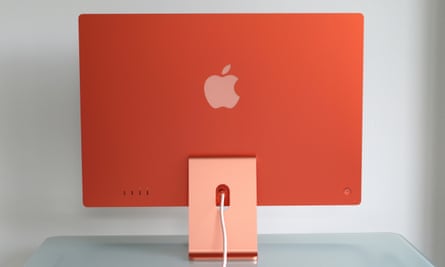
Apple’s M1 iMac: A Colorful Reinvention of the Desktop
Introduced in 2021, the 24-inch iMac with the M1 chip marked a major change for Apple’s all-in-one desktop. It was the first iMac powered by Apple silicon, replacing Intel processors with Apple’s own system-on-a-chip design. The result was a thinner, quieter computer with a bright new look and strong performance for everyday work.
A Fresh Design
The M1 iMac brought back color to the iMac lineup, with options including blue, green, pink, silver, yellow, orange, and purple. Its slim aluminum body measures about 11.5 millimeters thick, and the power cable attaches magnetically. A color-matched stand lets the display tilt, while the computer’s components are built into the panel itself.
The design also introduced a few trade-offs. The screen has a white border, and the lower bezel is larger than the sides and top. The iMac is also less adjustable than some desktop monitors: its stand offers tilt but not height adjustment, unless a VESA-mount configuration is chosen.
Sharp 4.5K Display
The 24-inch Retina display has a resolution of 4,480 by 2,520 pixels, for more than 11 million pixels in total. It supports the P3 wide color gamut and True Tone, which adjusts the display’s color temperature to suit the surrounding light. With a rated brightness of 500 nits, the screen is well suited to everyday work, photo viewing, and video.
What the M1 Chip Can Do
Apple’s M1 combines the processor, graphics, memory, and other functions on a single chip. It made the iMac responsive for common tasks such as web browsing, office work, video calls, and photo editing, while also enabling many demanding creative applications to run smoothly. The computer operates quietly because it needs relatively little cooling for typical workloads.
The M1 iMac was sold with either a seven-core or eight-core graphics processor, depending on configuration. Memory is integrated into the chip package, with configurations of up to 16GB of unified memory. That design helps the components share data efficiently, but it also means the memory cannot be upgraded later. Storage is similarly selected at purchase rather than expanded internally afterward.
Ports, Camera, and Sound
Port selection varies by model. The entry-level configuration has two Thunderbolt/USB 4 ports. Higher configurations add two USB 3 ports, and Gigabit Ethernet is available through the power adapter on supported configurations. There is no built-in SD card slot or HDMI port, so some users may need an adapter or hub.
The built-in 1080p FaceTime HD camera, studio-quality microphone array, and six-speaker sound system make the iMac a capable setup for video calls and media. The speakers support spatial audio when playing compatible content. Apple also offered color-matched accessories, including a keyboard, mouse, and trackpad; certain configurations could include a Magic Keyboard with Touch ID.
Who Is the M1 iMac For?
The M1 iMac is a good fit for people who want a tidy, all-in-one computer for home, school, or office use. Its display, speakers, camera, and performance are all built into one device, reducing the need to buy and connect separate components. It can also handle many creative tasks, though people working with especially demanding video, 3D, or other professional workloads may prefer a more powerful desktop.
Its main limitations are the lack of internal upgrades, modest port selection, and fixed-height stand. Anyone considering a used or refurbished M1 iMac should check its memory and storage configuration, included accessories, and condition, since those details cannot easily be changed later.
A Milestone in the iMac’s History
The M1 iMac combined Apple’s transition to its own processors with a distinctive redesign. Its colorful finish and thin profile made it stand out, while the M1 delivered a substantial leap in efficiency and everyday performance. Although later iMac generations have succeeded it, the 2021 model remains an important chapter in the evolution of Apple’s all-in-one desktop.
Everything You Need to Know About the M1 iMac: Specs, Performance, Upgradability, Ports, Display, and External Support
- What are the main specifications of the M1 iMac?
- How well does the M1 iMac perform for everyday tasks and creative work?
- Can you upgrade the RAM or storage in an M1 iMac?
- What ports are available on the M1 iMac?
- What is the screen size and resolution of the M1 iMac?
- Does the M1 iMac support external displays?
What are the main specifications of the M1 iMac?
The M1 iMac features a 24-inch 4.5K Retina display with a resolution of 4,480 × 2,520 pixels, up to 500 nits of brightness, and support for P3 wide color and True Tone. It is powered by Apple’s M1 chip, with an 8-core CPU and either a 7-core or 8-core GPU, plus up to 16GB of unified memory and up to 2TB of SSD storage, depending on configuration. Other key features include a 1080p FaceTime HD camera, a six-speaker sound system, Wi-Fi 6, and Thunderbolt/USB 4 ports; higher-end configurations include additional USB 3 ports.
How well does the M1 iMac perform for everyday tasks and creative work?
The M1 iMac handles everyday tasks—such as browsing, email, video calls, and office work—quickly and smoothly. It can also manage many creative workloads, including photo editing, graphic design, and light to moderate video editing, with responsive performance and quiet operation. More demanding professional projects, such as complex 3D work or intensive video production, may benefit from a Mac with a more powerful chip and additional memory.
Can you upgrade the RAM or storage in an M1 iMac?
No, the M1 iMac’s memory and internal storage can’t be upgraded after purchase. Its unified memory is integrated into the M1 chip package, and the storage is not designed for user replacement. Choose a configuration with enough RAM and storage for your needs when buying; for extra space later, you can use an external drive or cloud storage.
What ports are available on the M1 iMac?
The M1 iMac includes two Thunderbolt/USB 4 ports and a 3.5 mm headphone jack on every model. Configurations with the 8-core GPU add two USB 3 ports, and their power adapter includes a Gigabit Ethernet port. The entry-level 7-core GPU model does not include those extra USB ports, though Ethernet may be available as a configuration option.
What is the screen size and resolution of the M1 iMac?
The M1 iMac has a 24-inch Retina display with a resolution of 4,480 × 2,520 pixels, providing over 11 million pixels for sharp text, detailed images, and crisp video. Its screen also supports the P3 wide color gamut and True Tone technology, which adjusts the display’s color temperature to match the surrounding light.
Does the M1 iMac support external displays?
Yes. The M1 iMac supports one external display in addition to its built-in screen, with a resolution of up to 6K at 60Hz through a Thunderbolt/USB 4 port. You can connect compatible displays directly or use an adapter for other connections, such as HDMI. It does not natively support multiple external displays.