
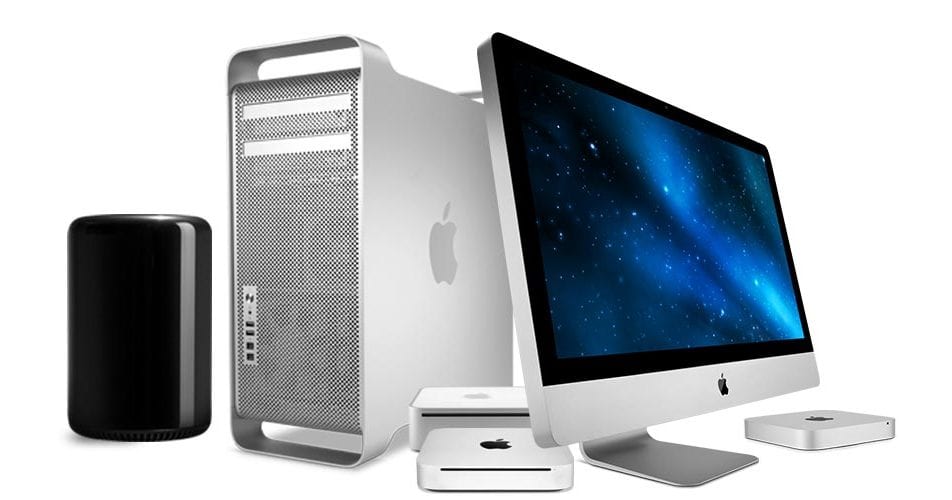
The Evolution of the iMac Computer
The iMac is a line of all-in-one Macintosh desktop computers designed and sold by Apple Inc. It was first introduced in 1998 and has since become one of Apple’s most iconic products.
The original iMac, known for its colorful, translucent design, was a groundbreaking product that helped revitalize Apple’s brand and set new standards for computer design. It featured a built-in CRT monitor, CD-ROM drive, and unique “Bondi Blue” color scheme.
Over the years, the iMac has undergone numerous redesigns and updates to keep up with technological advancements. From the introduction of flat-panel displays to the integration of Intel processors, each new generation of iMac has brought improvements in performance, design, and functionality.
Today’s iMac models feature high-resolution Retina displays, powerful processors, and sleek aluminum enclosures. They are popular choices for creative professionals, students, and anyone looking for a reliable and stylish desktop computer.
With its combination of innovative design, powerful hardware, and user-friendly software, the iMac continues to be a key product in Apple’s lineup. Its evolution over the years reflects Apple’s commitment to pushing the boundaries of technology while maintaining its reputation for quality and style.
8 Reasons Why the iMac is the Perfect Blend of Style and Performance
- Sleek and stylish design that enhances any workspace
- High-resolution Retina display for crisp and vibrant visuals
- Powerful performance to handle demanding tasks with ease
- Integrated hardware and software for seamless user experience
- Quiet operation with efficient cooling system
- Compact all-in-one design saves space on your desk
- Easy setup and minimal cable clutter for a clean look
- Reliable build quality and long-term durability
7 Drawbacks of iMac Computers: Limited Upgrades, Higher Costs, and More
- Limited upgrade options compared to traditional desktop PCs
- Higher price point compared to some Windows-based desktops with similar specifications
- Limited gaming performance compared to dedicated gaming PCs
- Lack of user-replaceable components, such as RAM and storage in newer models
- Potential compatibility issues with certain software or peripherals not optimized for macOS
- Less customization options in terms of hardware configurations compared to building a custom PC
- Limited port selection on some iMac models may require the use of adapters for certain devices
Sleek and stylish design that enhances any workspace
The sleek and stylish design of the iMac computer is a standout feature that enhances any workspace. With its slim profile, minimalist aesthetic, and high-quality materials, the iMac adds a touch of elegance to any environment. Whether placed in a modern office, a creative studio, or a home workspace, the iMac’s design effortlessly complements its surroundings, making it not just a powerful computing tool but also a visually appealing addition to any space.
High-resolution Retina display for crisp and vibrant visuals
The iMac’s high-resolution Retina display delivers crisp and vibrant visuals that enhance the user experience. With its exceptional pixel density and color accuracy, the Retina display brings images, videos, and graphics to life with stunning clarity and detail. Whether you’re editing photos, watching movies, or browsing the web, the sharpness and richness of the display on the iMac ensure that every visual element is rendered beautifully for an immersive viewing experience.
Powerful performance to handle demanding tasks with ease
The iMac computer stands out for its powerful performance, effortlessly handling demanding tasks with ease. Whether it’s graphic design, video editing, or intensive multitasking, the iMac’s robust hardware and optimized software work seamlessly together to deliver a smooth and efficient user experience. With high-performance processors, ample memory, and advanced graphics capabilities, the iMac empowers users to tackle complex projects without compromise, making it a reliable choice for professionals and creatives seeking top-notch performance in a desktop computer.
Integrated hardware and software for seamless user experience
The iMac computer offers a seamless user experience by integrating its hardware and software in a way that ensures optimal performance and usability. This tight integration allows for smooth communication between the components, resulting in a more efficient and responsive system. Users benefit from a cohesive and intuitive interface that enhances productivity and simplifies tasks, making the iMac a user-friendly and reliable choice for both casual users and professionals alike.
Quiet operation with efficient cooling system
The iMac computer stands out for its quiet operation and efficient cooling system, providing users with a peaceful computing experience. The well-designed cooling system ensures that the iMac remains cool under heavy workloads, preventing overheating and maintaining optimal performance. This feature not only enhances the longevity of the hardware but also contributes to a quieter working environment, making the iMac a reliable and user-friendly choice for those who value a noise-free workspace.
Compact all-in-one design saves space on your desk
The compact all-in-one design of the iMac computer is a standout feature that offers a space-saving solution for users. By integrating the display, processor, and other components into a single sleek unit, the iMac helps to declutter and optimize desk space. This design not only enhances the aesthetics of the workspace but also promotes better organization and efficiency, making it an ideal choice for users looking to maximize their desktop area without compromising on performance or style.
Easy setup and minimal cable clutter for a clean look
The iMac computer offers a significant advantage in its easy setup process and minimal cable clutter, resulting in a clean and sleek appearance. With all the essential components built into the monitor, users can enjoy a hassle-free setup experience without dealing with multiple cables and accessories. This not only saves time but also contributes to a tidy workspace, enhancing the overall aesthetics of the iMac and promoting a clutter-free environment for increased productivity and focus.
Reliable build quality and long-term durability
The iMac computer is renowned for its reliable build quality and long-term durability, making it a dependable choice for users seeking a computer that can withstand the test of time. With sturdy construction and high-quality components, iMacs are built to last, providing users with a reliable computing experience that can endure years of use without compromising performance or functionality. This focus on durability ensures that iMac users can rely on their machines for both work and leisure activities, making it a worthwhile investment for those looking for a long-lasting and dependable computing solution.
Limited upgrade options compared to traditional desktop PCs
One notable con of the iMac computer is its limited upgrade options when compared to traditional desktop PCs. Due to its all-in-one design and compact form factor, the iMac is not as easily customizable or upgradable as traditional tower-style desktop computers. Users may find it challenging to upgrade components such as the processor, graphics card, or storage on their own, which can limit the longevity and flexibility of the iMac compared to more modular PC systems. This lack of upgradeability may be a concern for power users or those who prefer to customize their hardware configurations based on their specific needs and preferences.
Higher price point compared to some Windows-based desktops with similar specifications
One notable drawback of the iMac computer is its higher price point compared to some Windows-based desktops with similar specifications. While iMacs are known for their premium build quality, sleek design, and seamless integration with Apple’s ecosystem, these features often come at a premium cost. This higher price can be a barrier for budget-conscious consumers or those who prioritize getting the best value for their money. Despite offering top-notch performance and user experience, the iMac’s pricing may make it less accessible to a wider range of users who are seeking a more affordable alternative with comparable specifications.
Limited gaming performance compared to dedicated gaming PCs
One notable drawback of the iMac computer is its limited gaming performance when compared to dedicated gaming PCs. While the iMac is a powerful and versatile machine suitable for various tasks, including graphic design and video editing, its hardware specifications may not always meet the demands of high-end gaming. The lack of upgradeability and customization options in the iMac can also limit its ability to keep up with the latest gaming technologies and trends. Gamers looking for top-tier performance and graphics may find that dedicated gaming PCs offer a more optimal gaming experience compared to the iMac.
Lack of user-replaceable components, such as RAM and storage in newer models
One notable drawback of newer iMac models is the lack of user-replaceable components, such as RAM and storage. Unlike older models that allowed users to easily upgrade these components themselves, newer iMacs are designed in a way that makes it difficult or impossible for users to perform these upgrades without professional assistance. This limitation can be frustrating for users who value the flexibility and cost-effectiveness of being able to upgrade their own hardware, as it may result in higher costs and inconvenience when seeking upgrades or repairs for their iMac computers.
Potential compatibility issues with certain software or peripherals not optimized for macOS
One potential downside of the iMac computer is the risk of encountering compatibility issues with certain software or peripherals that are not optimized for macOS. While Apple strives to provide a seamless user experience with its operating system, there may be instances where third-party software or devices do not work as intended on the iMac. This can be frustrating for users who rely on specific programs or hardware that may not be fully compatible with macOS, leading to limitations in functionality and potential workarounds needed to address these compatibility challenges.
Less customization options in terms of hardware configurations compared to building a custom PC
One notable downside of the iMac computer is its limited customization options when it comes to hardware configurations, especially when compared to building a custom PC. While Apple offers different pre-configured models of the iMac with varying specifications, users have less flexibility to choose and upgrade individual components such as the processor, graphics card, or storage capacity. This lack of customization can be a drawback for users who prefer to tailor their computer’s hardware to specific needs or who enjoy the process of building and upgrading their own PC systems.
Limited port selection on some iMac models may require the use of adapters for certain devices
Some users have expressed frustration over the limited port selection on certain iMac models, which may necessitate the use of adapters to connect certain devices. This can be inconvenient for individuals who rely on a variety of peripherals and accessories that require different types of ports. Having to use adapters not only adds extra clutter to the workspace but also introduces the possibility of compatibility issues or reduced performance. Users who heavily rely on a wide range of devices may find this limitation to be a drawback when considering an iMac purchase.