
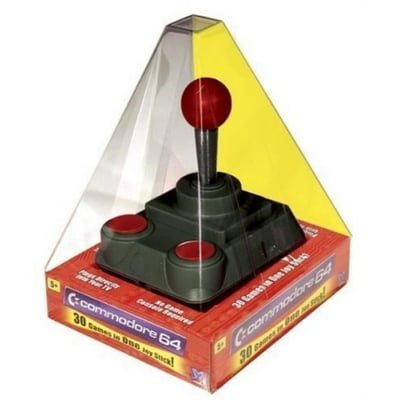
The History of the Commodore Joystick
Commodore, a pioneering company in the computer industry, was not only known for its innovative computers but also for its range of peripherals and accessories. One such iconic accessory was the Commodore joystick.
The Commodore joystick was a crucial input device for many users of Commodore computers, such as the popular Commodore 64. With its simple design and responsive controls, the joystick allowed users to play a wide variety of games with ease.
One of the most famous Commodore joysticks was the Competition Pro, known for its durability and precision. Gamers around the world relied on this joystick to navigate through challenging levels and compete in virtual worlds.
Over the years, Commodore released several iterations of joysticks, each improving upon the last with enhanced features and ergonomics. These joysticks became an integral part of the gaming experience on Commodore computers and are still fondly remembered by enthusiasts today.
While modern gaming has evolved far beyond what was possible with early joysticks, the legacy of the Commodore joystick lives on in the hearts of retro gaming fans. Its simple yet effective design paved the way for future innovations in gaming peripherals and left an indelible mark on gaming history.
Whether you were a seasoned gamer or a casual user, the Commodore joystick was a symbol of fun and excitement during an era when computing was just beginning to capture our imaginations.
Everything You Need to Know About Commodore Joysticks: FAQs and Tips
- What is a Commodore joystick?
- Which Commodore computers are compatible with joysticks?
- Where can I buy a Commodore joystick?
- Are there modern alternatives to the original Commodore joysticks?
- How do I connect a Commodore joystick to my computer?
- Can I use a joystick from another brand with a Commodore computer?
- What are some popular games that were played using Commodore joysticks?
- Are there any tips for maintaining and cleaning a Commodore joystick?
- Is it possible to repair a faulty Commodore joystick?
What is a Commodore joystick?
A Commodore joystick is a specialized input device designed for use with Commodore computers, such as the popular Commodore 64. It typically features a stick or lever that can be moved in different directions to control on-screen movement, along with one or more buttons for triggering actions in games or applications. The Commodore joystick was an essential accessory for gamers and users looking for precise and responsive control over their computer experience. With its simple yet effective design, the Commodore joystick became synonymous with the era of retro gaming and remains a beloved piece of computing history among enthusiasts and collectors.
Which Commodore computers are compatible with joysticks?
Many Commodore computers are compatible with joysticks, providing users with a convenient and immersive gaming experience. Some of the most popular Commodore models that support joysticks include the legendary Commodore 64, the versatile Commodore 128, and the innovative Commodore Amiga series. These computers were designed to work seamlessly with various joystick models, allowing users to enjoy a wide range of games and applications that required precise control inputs. Whether you are a retro gaming enthusiast or a casual user looking to explore the world of vintage computing, these compatible Commodore computers offer a nostalgic and enjoyable way to interact with technology.
Where can I buy a Commodore joystick?
If you are looking to purchase a Commodore joystick, there are several options available to you. Online marketplaces such as eBay, Amazon, and specialty retro gaming stores often have a selection of vintage Commodore joysticks for sale. You can also check out online auction sites or forums dedicated to retro computing enthusiasts, where sellers may offer a variety of Commodore peripherals for purchase. Additionally, local thrift stores, flea markets, and retro gaming conventions can sometimes be treasure troves for finding classic Commodore joysticks. Keep an eye out for listings from collectors or sellers who specialize in vintage computer equipment to find the perfect Commodore joystick for your gaming needs.
Are there modern alternatives to the original Commodore joysticks?
For those wondering about modern alternatives to the original Commodore joysticks, there are indeed several options available today. Many third-party manufacturers produce joysticks that are compatible with Commodore computers through USB adapters or emulation software. These modern alternatives often feature enhanced ergonomics, additional buttons, and improved durability compared to the original joysticks. While purists may prefer the nostalgic feel of the original Commodore joysticks, these modern alternatives provide a convenient and reliable way to enjoy classic gaming experiences on Commodore computers in the present day.
How do I connect a Commodore joystick to my computer?
To connect a Commodore joystick to your computer, you will need to locate the joystick port on your Commodore computer. The joystick port is typically located on the side or back of the computer and is specifically designed to accommodate the unique connector of the Commodore joystick. Simply insert the joystick connector into the port, making sure it is securely in place. Once connected, you should be able to start using the joystick to control games and other applications on your Commodore computer with ease.
Can I use a joystick from another brand with a Commodore computer?
When it comes to using a joystick from another brand with a Commodore computer, compatibility can sometimes be a concern. While some joysticks may work with Commodore computers, it’s important to check for compatibility issues such as different connectors or button configurations. In some cases, adapters or modifications may be needed to ensure that the joystick functions properly with a Commodore system. It’s always recommended to consult user manuals or online forums for guidance on using joysticks from other brands with Commodore computers to ensure a seamless gaming experience.
What are some popular games that were played using Commodore joysticks?
Many popular games were enjoyed using Commodore joysticks, becoming synonymous with the gaming experience on Commodore computers. Classic titles such as “Pac-Man,” “Space Invaders,” “Donkey Kong,” and “Pitfall!” were among the favorites that players would engage with using their trusty Commodore joysticks. These games, known for their addictive gameplay and challenging levels, showcased the versatility and responsiveness of the Commodore joystick, enhancing the overall gaming experience for users of all ages.
Are there any tips for maintaining and cleaning a Commodore joystick?
When it comes to maintaining and cleaning a Commodore joystick, there are a few tips to keep in mind. Firstly, it’s important to regularly clean the exterior of the joystick with a soft cloth and mild cleaning solution to remove any dirt or grime that may have accumulated over time. Avoid using harsh chemicals that could damage the plastic or buttons. Additionally, you can use compressed air to blow out any dust or debris that may be trapped inside the joystick. If the joystick is showing signs of wear or stiffness in movement, consider lubricating the internal components with a small amount of silicone-based lubricant to restore smooth operation. By following these simple maintenance tips, you can help prolong the life of your Commodore joystick and ensure optimal performance for years to come.
Is it possible to repair a faulty Commodore joystick?
Repairing a faulty Commodore joystick is indeed possible, depending on the extent of the damage and your technical skills. Common issues with Commodore joysticks include loose connections, unresponsive buttons, or worn-out components. You can try opening up the joystick to inspect and clean the internal parts, check for loose wires or solder joints, and replace any damaged components if necessary. There are also online resources and forums where you can find troubleshooting tips and step-by-step guides for repairing Commodore joysticks. If you’re not comfortable with DIY repairs, seeking help from a professional technician or retro computing enthusiast may be a good option to get your faulty Commodore joystick back in working condition.