
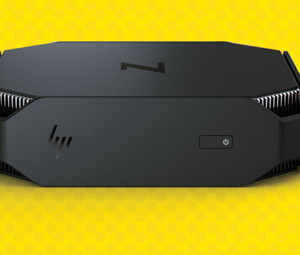
Exploring the HP Z2 Mini: A Compact Powerhouse
The HP Z2 Mini is a powerful workstation that packs impressive performance into a compact form factor. Designed for professionals in need of high computing power in a small package, the Z2 Mini offers a range of features that make it a versatile and efficient workstation.
Despite its small size, the HP Z2 Mini is equipped with powerful hardware that can handle demanding tasks with ease. With options for Intel Core or Xeon processors, NVIDIA Quadro graphics, and up to 64GB of RAM, the Z2 Mini is capable of handling intensive workloads such as 3D modeling, rendering, and virtual reality applications.
In addition to its powerful performance, the Z2 Mini is designed for efficiency and versatility. Its compact size allows it to fit easily on or under a desk, making it ideal for small workspaces. The workstation also features multiple ports for connecting peripherals and external devices, as well as customizable storage options to suit individual needs.
Despite its compact design, the HP Z2 Mini does not compromise on reliability or security. It undergoes rigorous testing to ensure durability and reliability under heavy workloads. Additionally, it comes equipped with security features such as HP Sure Start Gen4 and HP Client Security Manager Gen4 to protect against unauthorized access and data breaches.
Overall, the HP Z2 Mini is a powerhouse workstation that offers impressive performance in a compact and versatile package. Whether you are a creative professional working on demanding projects or an IT professional in need of reliable computing power, the Z2 Mini is sure to meet your needs.
Unleash High-Performance Computing with the Compact HP Z2 Mini: A Versatile and Secure Workstation
- Powerful performance in a compact form factor
- Versatile workstation for various tasks such as 3D modeling and rendering
- Options for Intel Core or Xeon processors for high computing power
- NVIDIA Quadro graphics for smooth graphics processing
- Up to 64GB of RAM for handling intensive workloads
- Compact size ideal for small workspaces
- Multiple ports for connecting peripherals and external devices
- Customizable storage options to suit individual needs
- Reliable and secure with features like HP Sure Start Gen4 and HP Client Security Manager Gen4
Considerations Before Choosing the HP Z2 Mini: 5 Potential Drawbacks
- Limited internal storage capacity compared to larger workstations
- Higher price point compared to consumer-grade desktops
- Limited upgrade options due to compact design
- May struggle with extremely demanding tasks compared to larger workstations
- Potential for thermal throttling under heavy workloads
Powerful performance in a compact form factor
The HP Z2 Mini stands out for its remarkable combination of powerful performance and compact form factor. Despite its small size, this workstation is equipped with high-end hardware components that deliver impressive computing power. This allows professionals to tackle demanding tasks such as 3D modeling, rendering, and virtual reality applications without compromising on performance. The compact design of the HP Z2 Mini makes it a versatile solution for those with limited workspace, offering a powerful workstation that can easily fit on or under a desk while delivering exceptional performance levels.
Versatile workstation for various tasks such as 3D modeling and rendering
The HP Z2 Mini stands out as a versatile workstation that excels in handling a wide range of tasks, including demanding processes like 3D modeling and rendering. With its powerful hardware configurations and robust performance capabilities, the Z2 Mini is well-equipped to tackle complex design projects and graphics-intensive tasks with efficiency and precision. Its adaptability across different workloads makes it a reliable choice for professionals seeking a workstation that can seamlessly transition between various tasks, ensuring optimal productivity and performance in diverse creative and technical environments.
Options for Intel Core or Xeon processors for high computing power
The HP Z2 Mini stands out for its versatility and high computing power, thanks to its options for Intel Core or Xeon processors. Whether you require robust performance for intensive tasks like 3D modeling, rendering, or virtual reality applications, the Z2 Mini’s choice of processors ensures that it can handle demanding workloads with ease. This flexibility in processor options allows users to customize their workstation based on their specific computing needs, making the HP Z2 Mini a top choice for professionals seeking powerful performance in a compact form factor.
NVIDIA Quadro graphics for smooth graphics processing
The HP Z2 Mini’s utilization of NVIDIA Quadro graphics ensures smooth and efficient graphics processing, making it an ideal choice for professionals working with graphic-intensive applications. Whether you are a designer, architect, or engineer, the powerful NVIDIA Quadro graphics in the Z2 Mini enable seamless rendering, modeling, and visualization of complex designs with precision and speed.
Up to 64GB of RAM for handling intensive workloads
The HP Z2 Mini’s ability to support up to 64GB of RAM is a standout feature that allows users to tackle intensive workloads with ease. With this impressive amount of memory, professionals can seamlessly work on resource-intensive tasks such as 3D modeling, rendering, and virtual reality applications without experiencing slowdowns or performance bottlenecks. The ample RAM capacity of the Z2 Mini ensures smooth multitasking and efficient handling of complex projects, making it a reliable choice for those who require high computing power in a compact workstation.
Compact size ideal for small workspaces
The compact size of the HP Z2 Mini makes it an ideal choice for small workspaces where space is limited. Its small footprint allows it to fit easily on or under a desk without taking up valuable space, making it a perfect solution for professionals working in tight office environments or home offices. Despite its size, the Z2 Mini does not compromise on performance, offering powerful computing capabilities that can handle demanding tasks efficiently.
Multiple ports for connecting peripherals and external devices
The HP Z2 Mini boasts a significant advantage with its multiple ports for connecting peripherals and external devices. This feature enhances the versatility and functionality of the workstation, allowing users to easily connect a wide range of devices such as monitors, keyboards, mice, external storage drives, and more. Whether you need to expand your workspace or transfer data quickly, the abundance of ports on the HP Z2 Mini ensures seamless connectivity for enhanced productivity and convenience.
Customizable storage options to suit individual needs
The HP Z2 Mini stands out for its customizable storage options, allowing users to tailor their storage configuration to meet their specific needs. Whether you require ample storage space for large files and projects or prioritize speed with solid-state drives, the Z2 Mini offers flexibility to accommodate a variety of storage preferences. This feature ensures that users can optimize their workstation for efficient workflow and seamless access to data, making the HP Z2 Mini a versatile and user-friendly choice for professionals in various industries.
Reliable and secure with features like HP Sure Start Gen4 and HP Client Security Manager Gen4
The HP Z2 Mini stands out for its exceptional reliability and security features, including HP Sure Start Gen4 and HP Client Security Manager Gen4. These advanced technologies ensure that the workstation is protected against unauthorized access and potential data breaches, giving users peace of mind when it comes to the security of their valuable information. With these robust security measures in place, users can trust that their work and sensitive data are safeguarded, making the HP Z2 Mini a reliable and secure choice for professionals in need of a trustworthy computing solution.
Limited internal storage capacity compared to larger workstations
One drawback of the HP Z2 Mini is its limited internal storage capacity when compared to larger workstations. Due to its compact size, the Z2 Mini may have fewer options for internal storage drives, which can be a limitation for users who require a large amount of storage space for their projects and files. While external storage solutions can help mitigate this limitation, some users may find the need for additional external devices less convenient or efficient than having ample internal storage within the workstation itself.
Higher price point compared to consumer-grade desktops
One downside of the HP Z2 Mini is its higher price point when compared to consumer-grade desktops. Due to its powerful hardware components and workstation-class performance, the Z2 Mini comes at a premium price that may be out of reach for budget-conscious consumers. While the workstation’s performance and reliability justify the cost for professionals in need of high computing power, the higher price tag may deter casual users or small businesses looking for more affordable options.
Limited upgrade options due to compact design
One drawback of the HP Z2 Mini is its limited upgrade options due to its compact design. The small form factor of the workstation makes it challenging to access and upgrade components such as the processor, graphics card, and storage. This limitation can be a concern for users who anticipate the need for future upgrades to keep up with evolving technology or changing computing requirements. As a result, users may find themselves restricted in their ability to customize and expand the capabilities of the HP Z2 Mini compared to larger, more easily upgradeable workstations.
May struggle with extremely demanding tasks compared to larger workstations
The HP Z2 Mini, despite its compact size and impressive performance, may struggle with extremely demanding tasks when compared to larger workstations. Due to its smaller form factor, the Z2 Mini may have limitations in handling exceptionally intensive workloads that require extensive processing power and resources. In such cases, users may find that larger workstations with more robust hardware configurations are better suited for tackling these highly demanding tasks effectively.
Potential for thermal throttling under heavy workloads
One potential drawback of the HP Z2 Mini is its susceptibility to thermal throttling under heavy workloads. Due to its compact size and powerful hardware components, the workstation may struggle to dissipate heat efficiently during prolonged periods of intense use. This can lead to a decrease in performance as the system reduces processing power to prevent overheating. Users who frequently engage in resource-intensive tasks may experience limitations in performance due to thermal throttling, requiring careful monitoring and possibly additional cooling solutions to mitigate this issue.