
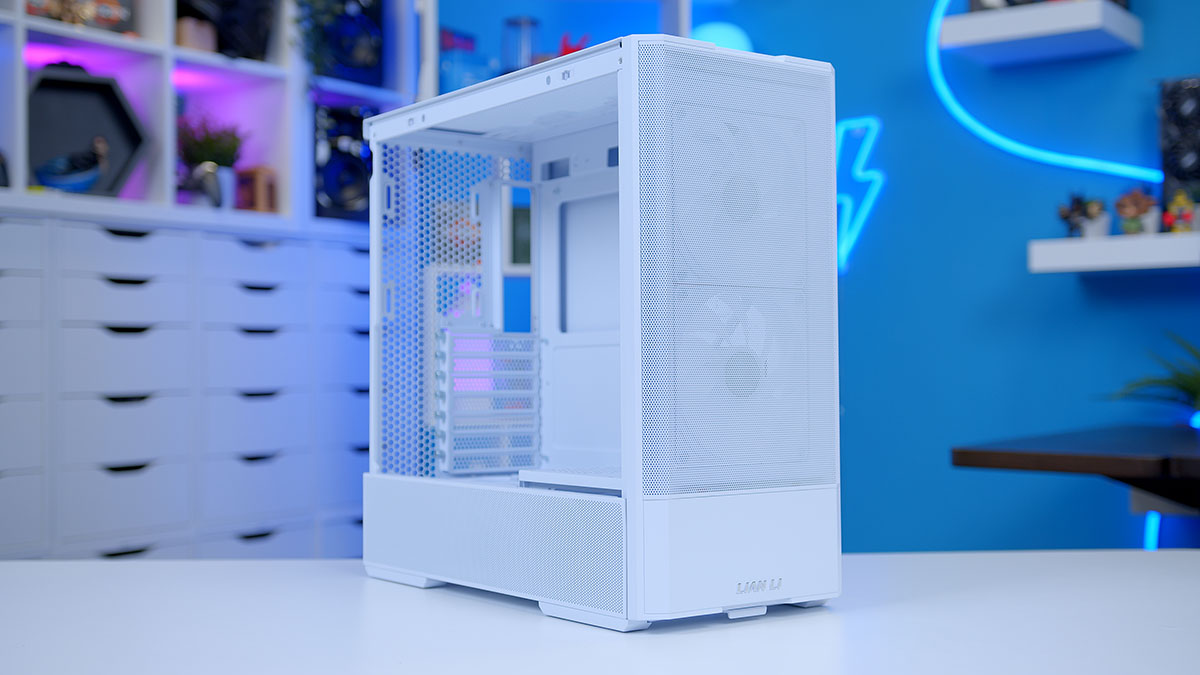
Lian Li LANCOOL: A Guide to the PC Case Series
Lian Li’s LANCOOL series is a family of computer cases designed for PC builders who want a balance of cooling, practical features, and distinctive styling. The lineup includes models for different build sizes and preferences, from compact systems to larger gaming PCs. Although each case has its own layout and feature set, LANCOOL models are generally built around airflow, straightforward assembly, and room to customize.
What Is Lian Li LANCOOL?
Lian Li is a computer-hardware manufacturer known for PC cases and accessories. LANCOOL is one of its case families, offering alternatives to the company’s premium-focused O11 designs. Many LANCOOL cases emphasize direct airflow through mesh panels and flexible fan and radiator mounting, while retaining the clean appearance often associated with Lian Li products.
The series has changed over time, so features vary considerably between models. A particular LANCOOL case may differ from another in size, front-panel design, included fans, storage mounts, radiator support, and cable-management options. Checking the specifications for the exact model is important before buying.
Design and Airflow
Airflow is a key consideration across much of the LANCOOL range. Depending on the model, a case may use a mesh front or other ventilated panels to let cool air reach the components. Fan positions are commonly provided at the front, top, and rear, though the number and size supported depend on the case.
Good airflow can help manage heat from components such as the processor and graphics card. The result of any build, however, depends on more than the case alone. Fan choice and placement, component temperatures, room conditions, and cable routing all play a part. Builders should also check whether the selected case supports the size of their planned air cooler or liquid-cooling radiator.
Features for PC Builders
LANCOOL cases are designed to accommodate common PC components, including standard motherboards, power supplies, graphics cards, and storage drives. The supported sizes and clearances differ by model. Some cases offer removable or adjustable brackets, convenient access to internal components, or dedicated channels and tie-down points for cable management.
Many models also include features intended to make assembly and everyday maintenance easier, such as removable filters or panels. These details can make a difference for builders who frequently upgrade their systems or want to keep dust under control. Before starting a build, review the manual for panel removal, fan installation, and cable-routing guidance.
Choosing the Right LANCOOL Case
The best LANCOOL case depends on the components and priorities of the build. Consider the following before choosing a model:
- Motherboard size: Confirm that the case supports the motherboard form factor you plan to use.
- Graphics card clearance: Compare the card’s length and thickness with the case’s published limits, allowing room for power cables.
- Cooling hardware: Check support for your CPU cooler, radiator, and desired fan configuration.
- Build dimensions: Make sure the case fits the available desk or floor space.
- Storage needs: Review the number and types of drive mounts if you plan to install multiple SSDs or hard drives.
- Included fans and accessories: Confirm what comes in the box, since packages and specifications vary by model and region.
Who Is a LANCOOL Case For?
A LANCOOL case may suit a first-time builder looking for a practical enclosure, as well as an experienced PC enthusiast assembling a gaming or workstation system. Models with open, ventilated layouts can appeal to people who prioritize cooling and component visibility, while the range’s different sizes and configurations offer options for a variety of builds.
As with any PC case, no single model is ideal for every system. A compact case may save space but limit component clearance, while a larger case can provide more room for cooling and upgrades. Matching the case to the build is more important than choosing by appearance alone.
Final Thoughts
The Lian Li LANCOOL series offers a range of PC cases with an emphasis on airflow, usability, and build flexibility. Since specifications differ across the lineup, compare the exact model’s dimensions, clearances, cooling support, and included accessories before making a decision. With the right fit, a LANCOOL case can provide a solid foundation for a clean, well-cooled PC build.
9 Essential Tips for Optimizing Your Lian Li LANCOOL Case Setup
- Check motherboard and GPU clearance before choosing a LANCOOL case.
- Plan airflow with front-to-back or bottom-to-top intake and exhaust.
- Confirm radiator size and placement fit your specific LANCOOL model.
- Use the included fan hub only after checking its power and control connections.
- Route cables behind the motherboard tray for cleaner airflow.
- Remove dust filters regularly to keep airflow strong.
- Check GPU length limits, especially with front-mounted radiators.
- Use the case manual to locate front-panel connectors.
- Verify fan direction before securing each fan.
Check motherboard and GPU clearance before choosing a LANCOOL case.
Before choosing a Lian Li LANCOOL case, check that it has enough room for both your motherboard and graphics card. LANCOOL models vary in size and layout, so confirm motherboard compatibility and compare the case’s maximum GPU length with your card’s dimensions. Remember to allow extra space for power cables and nearby fans or radiators to help ensure everything fits comfortably.
Plan airflow with front-to-back or bottom-to-top intake and exhaust.
When planning airflow in a Lian Li LANCOOL case, aim for a clear path that moves cool air in and warm air out. A common setup uses front fans as intake and rear or top fans as exhaust, creating front-to-back airflow. In cases with bottom fan mounts, bottom-to-top airflow can also help direct cool air toward the graphics card and carry heat upward. Check your specific LANCOOL model’s fan positions, then balance intake and exhaust while keeping vents clear for consistent cooling.
Confirm radiator size and placement fit your specific LANCOOL model.
Before choosing a liquid cooler, confirm that its radiator size and placement are supported by your specific Lian Li LANCOOL model. Case layouts and clearances vary, and a radiator’s thickness—especially with fans attached—can affect space for the motherboard, memory, or graphics card. Check the case manual and manufacturer specifications, then compare them with your cooler’s dimensions to avoid fit issues during installation.
Use the included fan hub only after checking its power and control connections.
Before connecting the included fan hub in your Lian Li LANCOOL case, check its manual and identify each power and control connection. Confirm that the hub’s power cable is connected to the correct power source and that its fan-control cable is attached to a compatible motherboard header, if required. Secure connections help prevent fans from failing to spin or respond to speed adjustments.
Route cables behind the motherboard tray for cleaner airflow.
Route cables behind the motherboard tray to keep the main compartment of your Lian Li LANCOOL case neat and unobstructed. Use the built-in cable channels and tie-down points to secure excess wiring, keeping it away from fans and airflow paths. This not only gives your build a cleaner appearance but can also make upgrades and maintenance easier.
Remove dust filters regularly to keep airflow strong.
Remove the dust filters from your Lian Li LANCOOL case regularly and clean them to help maintain strong airflow. Dust buildup can restrict ventilation and make it harder for your system to stay cool. Follow the case manual’s instructions when removing the filters, and make sure they’re completely dry before reinstalling them.
Check GPU length limits, especially with front-mounted radiators.
Before choosing a graphics card for a Lian Li LANCOOL case, check the case’s maximum GPU length and compare it with your card’s dimensions. Front-mounted radiators and fans can take up space inside the case, reducing the room available for the GPU, so the listed clearance may vary depending on your cooling setup. For a smooth fit, account for the radiator and fans—and leave enough space for the GPU’s power cables.
Use the case manual to locate front-panel connectors.
Use the case manual to locate the front-panel connectors before connecting the power switch, reset switch, power LED, and other case leads to the motherboard. The manual’s diagrams can help you match each plug to the correct header and orientation, reducing guesswork and helping prevent connection errors.
Verify fan direction before securing each fan.
Before securing each fan in your Lian Li LANCOOL case, verify its direction so air flows the way you intend. Most fans have small arrows on the frame showing airflow direction and blade rotation; use them to plan intake and exhaust positions. A quick check before tightening the screws can prevent having to remove and reinstall fans later, and helps create balanced airflow through the case.