
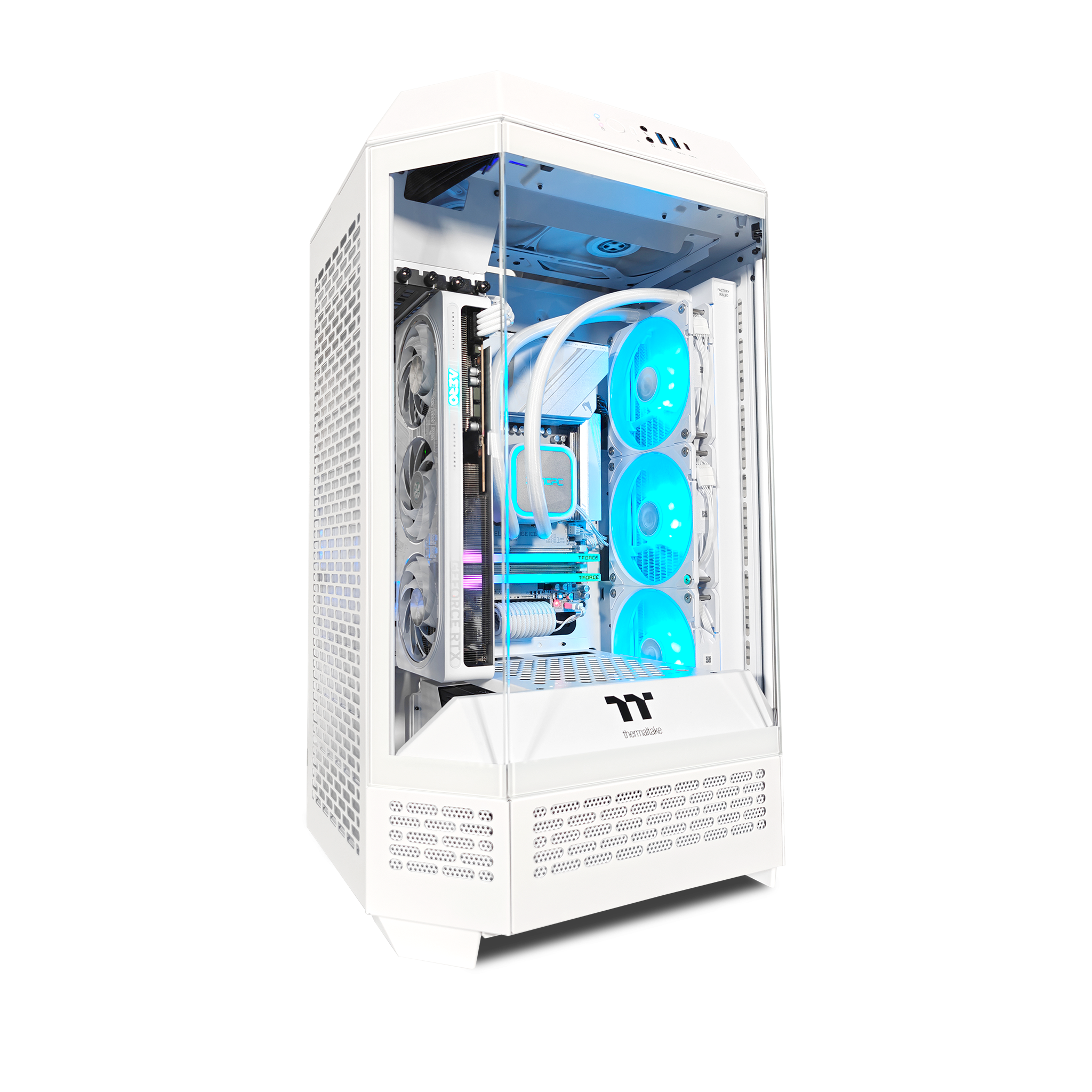
Small Gaming PCs: Big Performance in a Compact Package
A small gaming PC can deliver an impressive gaming experience without taking up much desk space. These compact systems—often called small-form-factor PCs—use smaller cases and carefully selected components to balance performance, cooling, noise, and size. Whether you want a tidy setup, a portable computer for events, or a PC that fits in a living room, a compact build can be a practical alternative to a traditional tower.
What Is a Small Gaming PC?
There is no single size that defines a small gaming PC. Some compact desktops use cases only slightly smaller than standard mid-tower models, while others are small enough to fit in a backpack. Many builds use Mini-ITX motherboards, but the case determines how much room is available for the graphics card, cooling system, power supply, and storage.
Smaller does not necessarily mean less powerful. A well-planned compact PC can run modern games at high settings. However, the smallest designs often require more careful component selection and may involve trade-offs in cooling, noise, upgrade options, or cost.
Why Choose a Compact Gaming PC?
- Save space: A compact case can fit on a small desk, under a television, or in a shared room.
- Create a cleaner setup: Smaller systems can make cable management and room layout easier.
- Take your PC with you: Some compact builds are portable enough for LAN parties or travel, though weight and access to a monitor still matter.
- Build a living-room gaming system: A small PC can connect to a television and work well as a console-style gaming setup.
Key Components to Consider
Case and Compatibility
Choose the case before buying the other components. Compact cases vary widely in the parts they support. Check the maximum graphics card length and thickness, CPU cooler height, radiator support, power supply size, and motherboard format. A part that fits one small case may not fit another.
Graphics Card
The graphics card has a major effect on gaming performance, but it is also one of the largest and hottest components in a PC. Compare its dimensions with the case specifications, including its thickness and required power connectors. Some compact cases support full-size graphics cards, while others require shorter or slimmer models.
Processor and Cooling
A powerful processor can help with high frame rates, simulation games, and demanding creative workloads. In a compact case, however, the processor’s heat output and the cooler’s size deserve special attention. A low-profile air cooler may be the simplest option for a very small build, while larger cases may accommodate tower coolers or liquid-cooling radiators.
Memory and Storage
Most gaming builds benefit from enough memory to run games and background applications comfortably. The right amount depends on your budget and the games you play. For storage, an M.2 solid-state drive can reduce cable clutter because it connects directly to the motherboard. Make sure the motherboard and case provide the storage connections and cooling you need.
Power Supply
Small cases may require a compact power supply, such as an SFX or SFX-L unit, rather than a standard ATX model. Confirm the supported format and cable clearances before purchasing. Leave enough power capacity for the graphics card and processor, and use the power supply’s manufacturer specifications to check connector requirements.
Cooling, Noise, and Airflow
Limited space can make heat management more challenging. A good compact build needs a clear path for cool air to enter and warm air to leave. Follow the case manufacturer’s recommended fan layout, avoid blocking vents, and keep cables from obstructing airflow.
Cooling performance also affects noise. Small fans may need to spin faster to move air, which can make a system louder under heavy gaming loads. Larger cases generally offer more room for fans and coolers, so the smallest case is not always the best choice. Look for independent reviews that test temperatures and noise with hardware similar to yours.
How to Choose the Right Size
Think about where the PC will sit and how often it will be moved. A slightly larger compact case may be easier to build in, quieter, and more flexible for future upgrades. An ultra-small system can save more space, but it may limit graphics card choices, cooling options, and access to internal components.
Before buying parts, make a compatibility checklist. Confirm that the motherboard, graphics card, cooler, power supply, and storage all fit the case at the same time. Pay close attention to manufacturer measurements and consider whether you may want to upgrade the graphics card later.
Building or Buying a Small Gaming PC
Building a compact PC gives you control over the components and can make it easier to prioritize performance, appearance, or quiet operation. The process can be more demanding than building in a roomy tower because parts may need to be installed in a specific order. Read the case manual before assembly and plan cable routing early.
A prebuilt small gaming PC is a convenient option if you want a complete system with support from one manufacturer. Before buying, check the exact component models, cooling design, upgrade options, warranty terms, and return policy. Compact desktops can look similar while using very different internal hardware.
Is a Small Gaming PC Right for You?
A small gaming PC is a strong choice when space, portability, or appearance is a priority. It can provide excellent gaming performance, but compact designs reward careful planning. If you want the widest component selection, easier upgrades, and more room for cooling, a larger case may be a better fit. If you are willing to check compatibility and balance performance with size, a compact system can make a capable and attractive gaming setup.
Small Gaming PC FAQs: 9 Answers About Performance, Cost, Builds, and Upgrades
- What is considered a small gaming PC?
- Can a small gaming PC run modern games?
- How much does a small gaming PC cost?
- What components do I need to build a small gaming PC?
- How do I choose a case for a small gaming PC?
- Do small gaming PCs overheat or make more noise?
- Can I upgrade a small gaming PC later?
- Is a small gaming PC good for 4K gaming?
- Is it cheaper to build or buy a small gaming PC?
What is considered a small gaming PC?
A small gaming PC is a desktop designed to take up less space than a standard tower while still being capable of playing games. There is no universal size cutoff, but compact models often use Mini-ITX motherboards and small-form-factor cases, ranging from compact desktops that fit on a desk to ultra-small systems that can be carried in a backpack. The case’s dimensions, rather than the motherboard alone, determine how small the PC is—and how much room it has for a graphics card, cooling, and upgrades.
Can a small gaming PC run modern games?
Yes, a small gaming PC can run modern games, and many compact systems offer performance comparable to full-size desktops. Gaming performance depends on the processor, graphics card, memory, and the resolution and settings you choose—not just the size of the case. Before buying or building, check that the case can fit your chosen components and provide enough cooling, since compact designs have less room for airflow.
How much does a small gaming PC cost?
The cost of a small gaming PC depends on its components, performance, and whether you build it yourself or buy a prebuilt system. A budget-friendly model may cost around $700–$1,000, while a midrange setup typically runs about $1,000–$1,800. High-performance compact PCs can cost $2,000 or more, especially when equipped with a powerful graphics card and specialized small-form-factor parts. Remember to include the cost of a monitor, keyboard, mouse, and operating system if they aren’t already included.
What components do I need to build a small gaming PC?
To build a small gaming PC, you’ll need a compact case and a compatible motherboard—often Mini-ITX—along with a processor, graphics card, memory, storage, power supply, and cooling. Check the case’s size limits before choosing parts, especially for the graphics card, CPU cooler, and power supply, since compact systems have less room for components and airflow. You may also need case fans, and an operating system and peripherals such as a monitor, keyboard, and mouse to complete your setup.
How do I choose a case for a small gaming PC?
Choose a small gaming PC case by starting with the components you plan to use, especially the graphics card, CPU cooler, motherboard, and power supply. Check the case’s dimensions and compatibility limits, including graphics card length and thickness, cooler height, and supported power supply size. Also consider airflow, fan or radiator support, front-panel ports, cable-management space, and how easy the case is to build in. A slightly larger compact case may offer better cooling, quieter operation, and more room for future upgrades than the smallest option.
Do small gaming PCs overheat or make more noise?
Small gaming PCs don’t automatically overheat or run loudly, but their compact cases can make cooling more challenging. With less room for airflow and cooling hardware, temperatures and fan noise may rise under heavy gaming loads—especially if the components are powerful or the case vents are blocked. Choosing compatible, efficient components, arranging fans properly, and keeping the system clean can help. For the quietest operation, consider a slightly larger compact case with room for better cooling.
Can I upgrade a small gaming PC later?
Yes, many small gaming PCs can be upgraded later, but the options depend on the case, motherboard, and power supply. You may be able to add memory or storage, replace the graphics card, or install a newer processor, provided the parts are compatible and fit. Compact cases can limit graphics card size, cooler height, and power supply choices, so check these specifications before buying. Choosing a system with some extra space and power capacity can make future upgrades easier.
Is a small gaming PC good for 4K gaming?
A small gaming PC can be good for 4K gaming, as long as it has a powerful graphics card and effective cooling. The case size itself doesn’t determine performance, but compact builds may limit your choice of graphics cards or make it harder to manage heat and noise. Check that the case supports the card you need and has adequate airflow, and choose components based on the games and frame rates you’re targeting.
Is it cheaper to build or buy a small gaming PC?
Whether it’s cheaper to build or buy a small gaming PC depends on the parts, sales, and level of performance you’re after. Building one can cost less because you choose each component and avoid some prebuilt-system markups, but compact cases and specialized parts—such as small power supplies or low-profile coolers—can add expense. A prebuilt PC may offer better value during promotions and includes the convenience of assembly, testing, and a single warranty. Compare systems with similar components, and factor in any tools, operating system, and support you’ll need before deciding.