
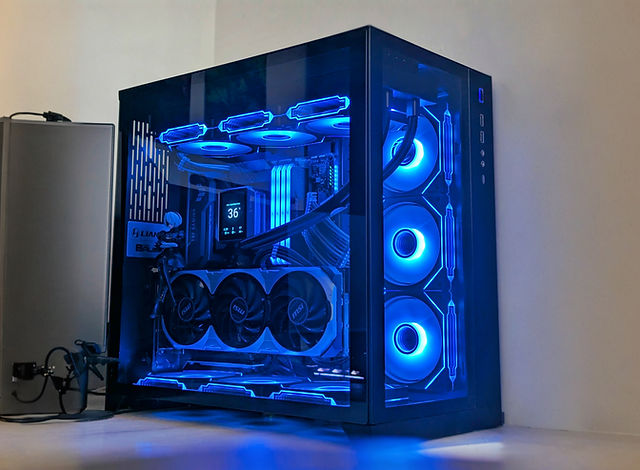
Custom-Built PCs: A Guide to Building a Computer That Fits Your Needs
A custom-built PC is a desktop computer assembled from individually selected components. Instead of buying a preconfigured system, you choose the parts—such as the processor, graphics card, memory, storage, and case—to match your budget and how you plan to use the computer.
Building a PC can be a rewarding way to get a system tailored to your needs. It also helps you understand how its components work together, making future upgrades and troubleshooting easier.
Why Build a Custom PC?
The biggest advantage of a custom-built PC is control. You can prioritize the features that matter most, whether that means strong gaming performance, quiet operation, creative-work capabilities, or a compact design. You can also decide where to spend and where to save, rather than accepting the component choices included in a prebuilt system.
A custom system can be easier to upgrade, too. If your needs change, you may be able to add memory or storage, replace the graphics card, or install a more powerful processor—provided the other components support the upgrade.
Choosing the Right Components
Processor
The central processing unit (CPU) handles instructions and calculations. A faster CPU can help with tasks such as compiling code, editing video, and running demanding applications. For gaming, the right choice depends on the games you play, your graphics card, and the resolution and frame rate you’re targeting.
Graphics Card
The graphics processing unit (GPU) renders images and is especially important for gaming, 3D work, and some creative applications. Choose a GPU that suits your monitor and workload. Higher resolutions and demanding visual settings generally require more graphics performance.
Memory
Random access memory (RAM) gives programs temporary working space. The amount you need depends on how you use your computer. Everyday tasks may require less memory than gaming, media production, or running several demanding applications at once. Check that the memory type and configuration are compatible with your motherboard.
Storage
Solid-state drives (SSDs) provide fast startup and loading times, while hard disk drives (HDDs) can offer more capacity for the price. Many builders use an SSD for the operating system and frequently used programs, then add a larger drive for files and media.
Motherboard
The motherboard connects the system’s components. It must be compatible with the chosen CPU and memory, and it should provide the ports, expansion slots, and storage connections you need. Consider future upgrades when deciding how many connections and slots to include.
Power Supply
The power supply unit (PSU) delivers electricity to the computer’s components. Choose a reliable unit with enough capacity for the system, including room for reasonable upgrades. The required wattage depends on the CPU, graphics card, and other components.
Case and Cooling
The case needs to fit the motherboard and graphics card, while allowing enough room for cooling and cable routing. Good airflow helps manage heat. Depending on the components and case, cooling may come from fans, a CPU air cooler, or a liquid-cooling system.
Check Compatibility Before You Buy
Compatibility is essential. Confirm that the CPU fits the motherboard socket, the motherboard supports the selected memory, and the case has room for the motherboard, graphics card, and cooler. Also check the power supply’s connectors and capacity. Using a reputable PC-building compatibility tool can help identify common issues, but it’s still worth reviewing component specifications yourself.
What to Expect During Assembly
PC assembly is manageable for many first-time builders, but it calls for patience and careful handling. A typical build involves installing the CPU, memory, and storage on the motherboard; mounting the motherboard in the case; installing the power supply and graphics card; and connecting power and case cables.
Before starting, prepare a clean workspace, keep component manuals nearby, and follow the manufacturer’s instructions. Avoid forcing parts into place, and handle components by their edges. After assembly, check all connections before powering on the system. You’ll then need to install an operating system and the appropriate drivers.
Budgeting for a Custom-Built PC
Start with your intended use and overall budget. Remember to account for more than the computer itself: a monitor, keyboard, mouse, operating system, and other accessories may add to the total. If the budget is limited, focus spending on the components that have the greatest effect on your main tasks, and leave room for upgrades later.
Prices and component availability can change quickly, so compare current options before purchasing. A balanced system is usually more useful than spending heavily on one component while leaving another as a bottleneck.
Is a Custom PC Right for You?
A custom-built PC is a good choice if you want control over the components, enjoy learning about computer hardware, or expect to upgrade the system over time. A prebuilt computer may be more convenient if you prefer a ready-to-use system with a single point of support. Both options can be worthwhile; the best choice depends on your priorities, budget, and comfort level.
Final Thoughts
Building a custom PC lets you create a computer around the way you work, play, and create. With careful planning, compatible parts, and a methodical approach to assembly, you can build a system that meets your needs today and gives you options for the future.
Custom-Built PC FAQs: Costs, $1,000 Budgets, and Best Options
- Is $1000 dollars enough to build a PC?
- What is a custom built PC?
- How much do custom built PCs cost?
- What is the best custom built PC?
Is $1000 dollars enough to build a PC?
Yes, $1,000 is enough to build a capable custom PC, especially if the budget is focused on the computer itself rather than a monitor, keyboard, and other accessories. A carefully chosen parts list can deliver solid performance for everyday tasks and 1080p gaming, though the exact results depend on current component prices and your priorities. Set aside some of the budget for essentials such as the case, power supply, storage, and cooling, and compare compatible parts before buying. If you also need peripherals or a Windows license, factor those into the total.
What is a custom built PC?
A custom-built PC is a computer assembled from separately chosen components, such as the processor, graphics card, memory, storage, and case. Unlike a prebuilt system with a fixed configuration, it can be tailored to your budget and needs, whether you use it for gaming, work, creative projects, or everyday tasks.
How much do custom built PCs cost?
Custom-built PCs can cost anywhere from a few hundred dollars to several thousand, depending on the components and performance you need. A basic system for everyday tasks may cost less than a midrange gaming PC, while high-end gaming, video editing, and workstation builds can be much more expensive. Remember to include the cost of a monitor, keyboard, mouse, operating system, and other accessories if you need them. Setting a budget and choosing parts for your intended use can help you get the best value.
What is the best custom built PC?
The best custom-built PC is the one that fits your needs, budget, and plans for future upgrades. A gaming PC may prioritize a powerful graphics card, while a system for video editing or software development may need a strong processor, ample memory, and fast storage. Consider component compatibility, cooling, reliability, and the cost of accessories such as a monitor and keyboard. There’s no single configuration that’s best for everyone, so choose parts based on the tasks you’ll use the PC for most.