
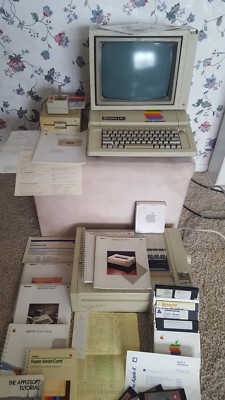
Apple IIe: The Apple II That Brought Computing to More People
Introduced in 1983, the Apple IIe was one of the most enduring members of Apple’s early personal-computer family. Its name came from “enhanced”: compared with earlier Apple II models, it offered more built-in memory, a more capable keyboard, and useful features that had previously required add-on hardware. The IIe kept the Apple II’s open, expandable design while making the system easier to use at home, in schools, and at work.
From the Apple II to the IIe
Apple had introduced the original Apple II in 1977. By the early 1980s, the Apple II line had built a large library of software and a loyal following, but its older models could require extra cards and upgrades to handle newer applications. The Apple IIe addressed many of those limitations while remaining compatible with much of the existing Apple II software and hardware.
Apple announced the IIe in January 1983. It came with 64 kilobytes of RAM, a full-size keyboard with upper- and lowercase letters, and a smaller number of expansion slots than some earlier Apple II models. Those changes helped make everyday tasks more convenient without abandoning the flexibility that had made the Apple II popular.
Hardware and capabilities
At its core, the Apple IIe used a 6502-family processor running at approximately 1 megahertz. The computer supported color graphics and sound, and could display text in either 40-column mode or, with additional memory hardware, 80-column mode. Its graphics modes made it suitable for games and educational programs as well as practical software.
The IIe was designed as a system to build around rather than an all-in-one computer. Users typically connected a monitor or television and could add a disk drive, printer, modem, or other peripherals. Expansion slots inside the computer allowed owners to install cards for additional functions, while Apple’s extensive software library gave the machine a wide range of uses.
Enhanced and Platinum models
In 1985, Apple released the Enhanced Apple IIe. It included a 65C02 processor and updated firmware, improving compatibility with newer software and bringing the model closer to the capabilities of the Apple IIc and Apple II Plus. The enhancement was also available as an upgrade for many existing IIe computers.
Apple later introduced the Platinum IIe, which had a lighter-colored case, a revised keyboard layout, and a built-in numeric keypad. It preserved the familiar Apple IIe platform while giving the computer a more contemporary appearance.
Why the Apple IIe mattered
The Apple IIe became especially well known in schools. Its durability, expandable design, and large selection of educational software made it a familiar presence in computer labs. Programs for writing, mathematics, science, and creative projects helped students use computers as learning tools, while games introduced many people to computing for the first time.
The machine also benefited from the broader Apple II ecosystem. Because software and accessories had accumulated over years of Apple II development, IIe owners could choose from a substantial range of applications and add-ons. That continuity helped the computer remain useful even as newer systems entered the market.
A lasting place in computer history
The Apple IIe remained in production until 1993, making it one of the longest-lived personal-computer models of its era. Its long run reflected more than nostalgia: it was a practical, adaptable computer supported by a large community of users, educators, developers, and hardware makers.
Today, the Apple IIe is remembered as a defining computer of the 1980s. It carried the Apple II tradition into classrooms and homes, helped make personal computing more accessible, and demonstrated the value of a platform that could grow through software, accessories, and community innovation.
6 Essential Tips for Using the Apple IIe
- Use a 5.25-inch floppy drive to load many classic programs.
- Press Control-Reset to interrupt a running program.
- Use the built-in keyboard for direct command entry.
- Save your work often to floppy disk.
- Check the power and cable connections if the screen stays blank.
- Use compatible Apple IIe software and peripherals.
Use a 5.25-inch floppy drive to load many classic programs.
A 5.25-inch floppy drive is a handy way to load many classic programs on an Apple IIe. Connect a compatible drive and insert a disk with the label facing up, then follow the software’s instructions—some disks start automatically when the computer is turned on, while others require a command such as PR#6 or CATALOG. Handle disks by their edges, keep them away from heat and magnets, and make sure the drive is compatible with your Apple IIe setup.
Press Control-Reset to interrupt a running program.
On the Apple IIe, pressing Control-Reset interrupts a running program and returns control to the system, which can be useful if an application freezes or you need to stop it quickly. Hold down Control, then press Reset; depending on the program, this may return you to BASIC or the prompt, though unsaved work may be lost.
Use the built-in keyboard for direct command entry.
Use the Apple IIe’s built-in keyboard to enter commands directly, making it easy to interact with the computer without additional input devices. At the BASIC prompt, type a command or program instruction and press Return to run it. The keyboard’s familiar layout and support for uppercase and lowercase letters make entering commands, editing code, and exploring software straightforward.
Save your work often to floppy disk.
On the Apple IIe, saving your work often to floppy disk helps protect it from being lost if the computer freezes, loses power, or you accidentally exit a program. Use the program’s Save command regularly, especially after making important changes, and keep a backup disk when possible. Floppy disks can wear out or become damaged, so label them clearly and store them in a safe, dry place away from magnets.
Check the power and cable connections if the screen stays blank.
If your Apple IIe screen stays blank, first check that the computer and monitor are powered on and that the monitor’s brightness is turned up. Make sure the video cable is firmly connected at both ends, and inspect the power cords and connections. Turn the computer and monitor off before reconnecting cables; then power them back on and check whether the display appears.
Use compatible Apple IIe software and peripherals.
To get the most from your Apple IIe, choose software and peripherals designed for the Apple II family, and check compatibility before buying or connecting anything. Many Apple II programs and accessories work with the IIe, but some require a particular model, memory expansion, interface card, or system configuration. Reviewing the product documentation—and confirming whether the software supports your version of the IIe—can help avoid setup problems and ensure your printer, disk drive, joystick, or other accessory works as expected.