
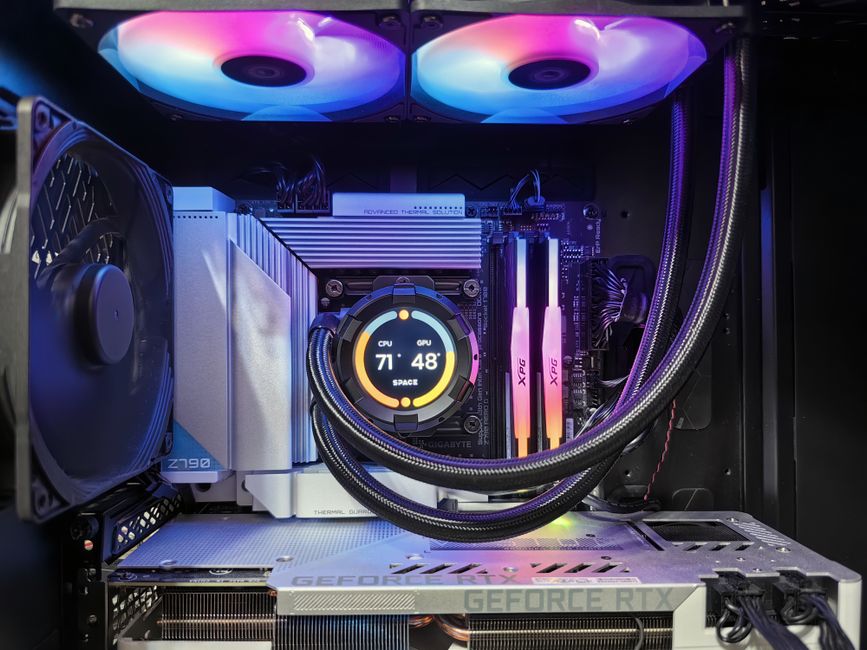
What Makes a PC Cool?
A cool PC can mean more than one thing. It might be a computer with a striking design, a powerful setup for gaming, or a system that stays cool under pressure. The best PCs bring these qualities together: they look great, perform reliably, and keep their components at safe temperatures.
Style That Fits You
For many builders, a PC is also a creative project. A clean, understated case can look just as impressive as one with colorful lighting and a transparent side panel. Cable management, coordinated components, and a thoughtful color scheme can make a build feel polished without making it complicated.
Lighting is another way to personalize a setup. RGB fans and light strips offer plenty of options, but a single color—or no lighting at all—can create an equally distinctive look. The goal is to choose a style you’ll enjoy seeing on your desk every day.
Performance That Feels Great
Looks are only part of the story. A cool PC should also suit the way you use it. A computer for everyday browsing and schoolwork has different needs from a gaming rig or a workstation for video editing. Choosing a suitable processor, graphics card, memory, and storage helps the system run smoothly without spending money on parts you don’t need.
Balance matters, too. Pairing components thoughtfully can help prevent one part from limiting the performance of another. It’s also worth considering future upgrades, such as adding more memory or storage later.
Keep Your PC Cool
Inside a computer, “cool” has a practical meaning: managing heat. Processors and graphics cards generate heat while working, and good airflow helps move it out of the case. Fans should bring fresh air in and guide warm air out, while clear space around the case allows vents to do their job.
Liquid cooling can be a good option for some builds, but it isn’t essential. A well-chosen air cooler can be quiet, effective, and easy to maintain. Whichever approach you choose, check that the cooler fits your case and is compatible with your components.
Simple habits also help. Keep dust filters clean, avoid blocking air vents, and make sure cables aren’t piled in front of fans. If temperatures seem unusually high, check that fans are connected and spinning, and that the cooler is installed correctly.
Build for Your Space and Budget
A compact PC can save desk space, while a larger case may offer easier installation and more room for future upgrades. Before buying parts, check measurements and compatibility—especially for the graphics card, CPU cooler, motherboard, and power supply. Setting a budget first makes it easier to prioritize the features that matter most.
The Coolest PC Is the One That Works for You
There’s no single recipe for a cool PC. It could be a quiet home computer, a colorful gaming setup, or a carefully planned machine for creative work. Combine a design you like with suitable components, dependable cooling, and room to grow, and you’ll have a PC that’s cool in every sense of the word.
8 Benefits of a Cool PC: Style, Speed, and Everyday Enjoyment
- Looks stylish and personalized
- Runs games and apps smoothly
- Stays cool with good airflow
- Can be upgraded over time
- Offers fast storage and loading
- Supports immersive gaming
- Fits your workspace and budget
- Makes everyday tasks enjoyable
6 Drawbacks of Building a Cool PC
- Can be expensive to build.
- RGB lighting may be distracting.
- High-performance parts use more power.
- Powerful PCs can generate lots of heat.
- Large cases take up space.
- Custom builds may need regular maintenance.
Looks stylish and personalized
A cool PC can make a workspace feel more personal while showing off your style. From a sleek case and carefully managed cables to colorful RGB lighting or a coordinated color scheme, small design choices can turn a computer into a setup that feels uniquely yours. Whether you prefer a bold look or a clean, minimalist design, a stylish PC can be both a practical tool and an eye-catching part of your room.
Runs games and apps smoothly
A cool PC runs games and apps smoothly, so you can enjoy responsive gameplay, quick load times, and seamless multitasking. With well-matched components, demanding programs feel less sluggish, and switching between tasks is easier—whether you’re gaming, editing photos, or streaming videos.
Stays cool with good airflow
A cool PC with good airflow moves fresh air through the case and carries heat away from important components, such as the processor and graphics card. This helps the system maintain reliable performance, reduces the risk of overheating, and can even keep fan noise down. With well-placed fans, clear vents, and regular dust cleaning, your PC can stay cool during everyday tasks and demanding gaming sessions alike.
Can be upgraded over time
One major advantage of a cool PC is that it can be upgraded over time. Instead of replacing the whole computer when your needs change, you can add more memory or storage, install a faster graphics card, or upgrade other compatible components. This flexibility can extend the life of your PC, spread costs over time, and help keep your system ready for new games, software, and projects.
Offers fast storage and loading
A cool PC can offer fast storage and loading, helping apps launch quickly, files transfer in less time, and games load with fewer delays. With a solid-state drive (SSD), everyday tasks feel more responsive, so you can spend less time waiting and more time getting things done.
Supports immersive gaming
A cool PC can make gaming feel more immersive, with smooth performance, detailed graphics, and responsive controls that help bring virtual worlds to life. A capable graphics card and processor can support high frame rates and rich visual effects, while a quality monitor and sound system add to the experience. Whether exploring a vast fantasy world or competing in a fast-paced match, the right PC setup can make every moment more engaging.
Fits your workspace and budget
A cool PC doesn’t have to take over your desk or stretch your budget. By choosing a size, components, and features that suit your workspace and needs, you can create a setup that feels comfortable, looks right at home, and delivers the performance you want. Planning your build around a clear budget also helps you focus on the parts that matter most and leave room for future upgrades.
Makes everyday tasks enjoyable
A cool PC can make everyday tasks more enjoyable by combining responsive performance with a design you love. Whether you’re browsing the web, organizing photos, joining a video call, or listening to music, a fast, reliable computer helps everything feel smoother and less frustrating. A comfortable setup, quiet fans, and a personalized look can turn routine computer time into something you genuinely look forward to.
Can be expensive to build.
One downside of building a cool PC is the cost. High-performance parts, stylish cases, RGB lighting, and advanced cooling can quickly push the price up, especially if you’re aiming for a powerful gaming or creative workstation. Careful planning helps: set a budget, prioritize the components that matter most, and add cosmetic upgrades later.
RGB lighting may be distracting.
RGB lighting can add personality to a PC, but bright or rapidly changing effects may become distracting, especially in a dim room or during work, gaming, or video calls. The glow can also draw attention away from the screen and disrupt a calm workspace. Choosing softer colors, slower effects, or turning the lighting off can make a setup more comfortable.
High-performance parts use more power.
One downside of a cool, high-performance PC is that powerful parts often use more electricity than standard components. A high-end graphics card or processor can also generate more heat, which may require additional fans or stronger cooling. This can increase energy costs, make the system noisier, and add to the expense of running it over time.
Powerful PCs can generate lots of heat.
One downside of a powerful PC is that its high-performance components can generate a lot of heat, especially during demanding tasks like gaming, video editing, or 3D rendering. Without good airflow and effective cooling, temperatures may rise, making fans louder and potentially reducing performance. Keeping vents clear, cleaning dust filters, and choosing suitable cooling can help manage the heat.
Large cases take up space.
One downside of a cool PC is that a large case can take up valuable space. Full-size towers may crowd a desk, occupy floor space, and be difficult to fit into smaller rooms or entertainment centers. Before choosing a case, measure the space where the computer will go and check that there’s room around it for airflow and easy access.
Custom builds may need regular maintenance.
One downside of a custom PC is that it may need regular maintenance to keep running well. Dust can collect on fans and filters, airflow can become restricted, and components may need occasional updates or troubleshooting. Cleaning the system and checking temperatures takes time, so a custom build may require more attention than a prebuilt computer.